napari Plugin
The napari-etsam plugin runs ETSAM inside napari, a free image viewer for multi-dimensional data. You open a tomogram, install and activate plugin, click Segment membranes. The membrane mask appears as an new label layer that you can refine, inspect and save.
Requirements
Section titled “Requirements”| Minimum | Recommended | |
|---|---|---|
| GPU | NVIDIA GPU with 2 GB VRAM | NVIDIA GPU with 4 GB+ VRAM |
| RAM | 4 GB | 8 GB |
| Operating system | Linux or Windows, with an NVIDIA GPU |
Installation
Section titled “Installation”1. Install the plugin
Section titled “1. Install the plugin”From napari (recommended):
- Install napari if you don’t have it yet. The napari bundle is the easiest option.
- In napari, open Plugins ▸ Install/Uninstall Plugins….
- Search for ETSAM, click Install next to napari-etsam, and restart napari.
With pip, in napari’s Python environment:
pip install napari-etsam2. First start: click Install ETSAM
Section titled “2. First start: click Install ETSAM”ETSAM itself runs in its own environment, separate from napari. When you open the ETSAM panel, the plugin checks whether ETSAM is installed. If it is missing on a supported computer, the panel shows an Install ETSAM button. Click it to start the ETSAM installer.
Installation downloads about 5 GB and may take 10–15 minutes. Keep napari open until it finishes; the panel shows progress. The installer puts ETSAM into ~/etsam_env (on Windows, %USERPROFILE%\etsam_env).
Segmenting a Tomogram
Section titled “Segmenting a Tomogram”- Open the panel: Plugins ▸ ETSAM Membrane Segmentation (napari-etsam).
- Open a tomogram: drag and drop an
.mrcfile onto napari, or click Open… in the panel. The new layer is selected as the Tomogram automatically. - Optionally, tick Clean up mask or Closely spaced membranes (see Options).
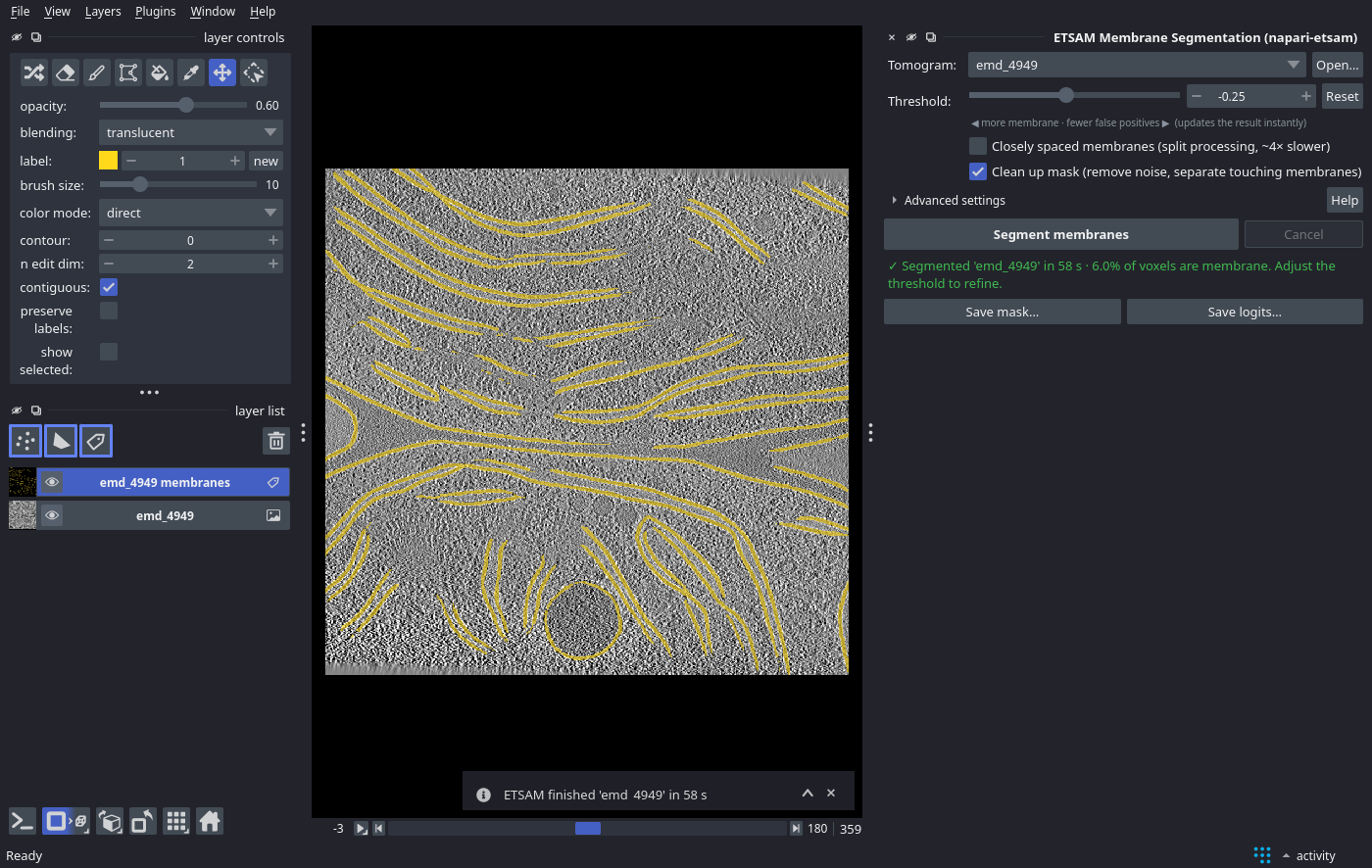
- Click Segment membranes. The progress bar follows ETSAM through Stage 1 and Stage 2 slice by slice, then through clean-up. Click Cancel to stop at any time.
- When finished, a
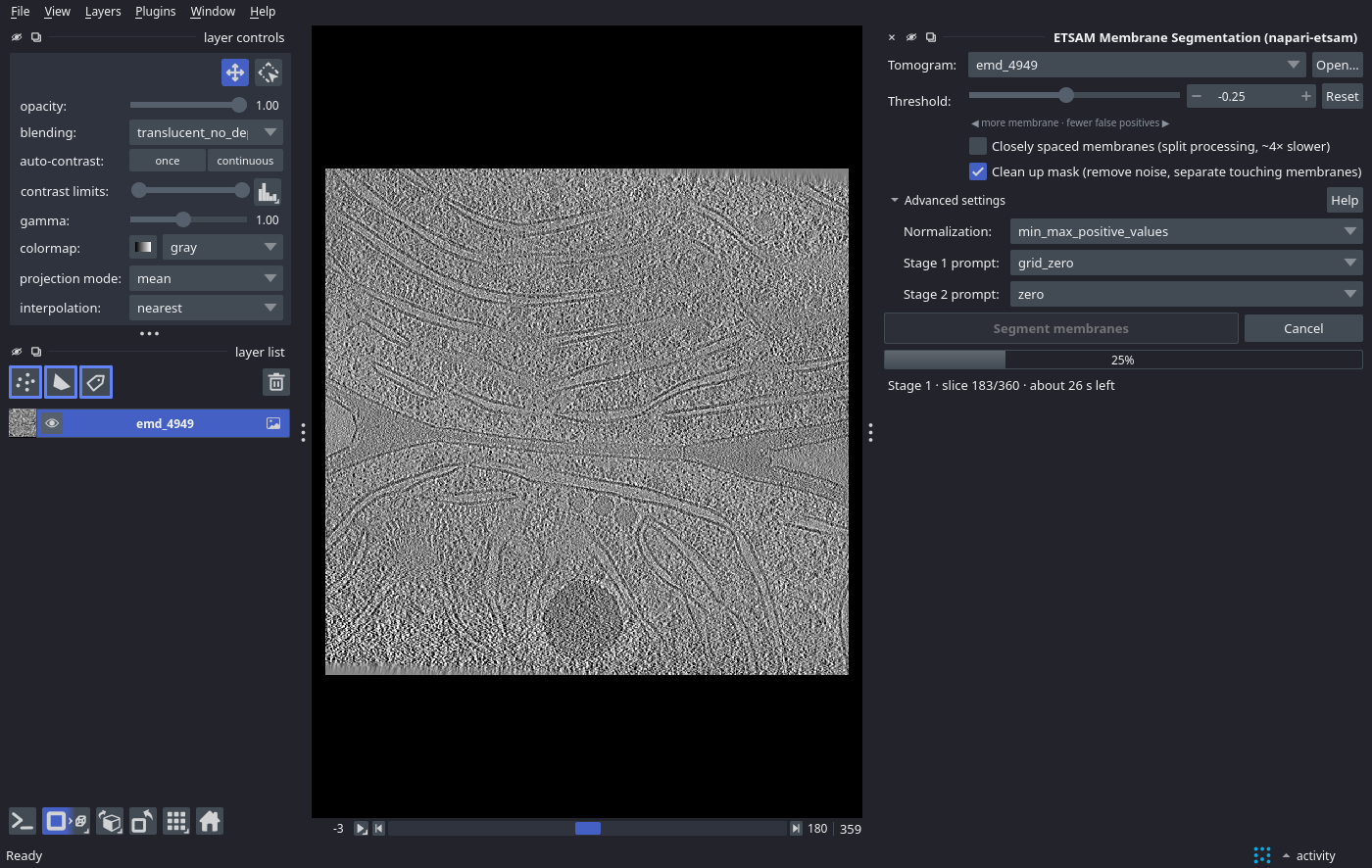
<tomogram> membraneslabel layer is added on top of the tomogram, and the panel shows the run time and the fraction of voxels classified as membrane. - Refine: move the Threshold slider. The mask updates instantly, and clean-up is re-applied in the background if enabled. Lower values find more (and fainter) membrane; higher values give fewer false positives. Reset returns to the default
-0.25. You can also correct the mask by hand with napari’s label tools (paint, erase, fill). - Save: click Save mask… (the mask at the current threshold, including manual edits) or Save logits… (raw membrane scores). Files are written as
.mrcwith the tomogram’s voxel size, so they overlay directly in ChimeraX, IMOD or other tools. File ▸ Save Selected Layers… with a.mrcfile name works too.
Options
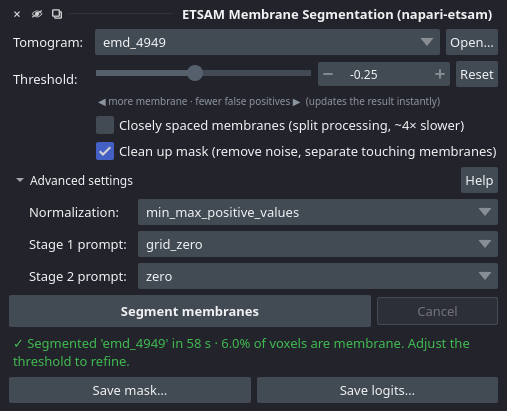
Section titled “Options”The main options are in the panel. The rest are under Advanced settings.
| Option | Command-line equivalent | Description |
|---|---|---|
| Threshold | --logit-threshold | Binarization threshold of the Stage 2 logits (default -0.25). Adjustable live after a run. |
| Closely spaced membranes | --split-processing | Segments the four Y/X quadrants separately with a denser prompt grid; separates closely apposed membranes. About 4× slower. |
| Clean up mask | --post-process | Removes thin noise blobs and cuts short bridges between parallel membranes, with the default post-processing settings. Compare with the raw result, because it can remove small real membranes. |
| Normalization | --normalize-method | Try Softplus if membranes are missed with the default. |
| Stage 1 / Stage 2 prompt | --stage1-prompt, --stage2-prompt | Prompting strategies; see Advanced Usage. |
The plugin and the etsam command produce the same results for the same settings.
Troubleshooting
Section titled “Troubleshooting”When something goes wrong, the panel shows a red box with the problem and a suggested fix. Show details displays the full error, and Copy error report copies it with your system information (versions, GPU) for a GitHub issue.
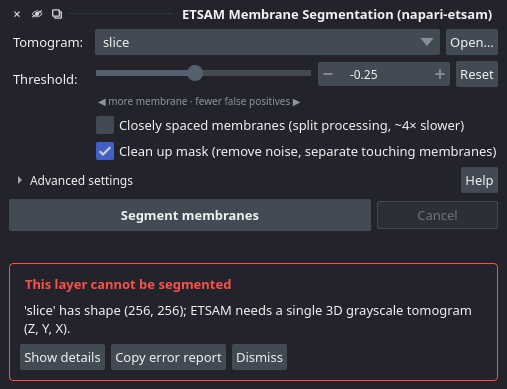
| Message | What to do |
|---|---|
| No tomogram selected | Open an .mrc file first (drag and drop, File ▸ Open or Open…). |
| This layer cannot be segmented | ETSAM needs a single 3D grayscale volume (Z, Y, X). Select the tomogram layer rather than a 2D image, RGB image or a time series. |
| Installing ETSAM failed: … requires an NVIDIA GPU | The installer supports NVIDIA GPUs only. Install ETSAM yourself as described in Installation. |
| Installing ETSAM failed: … the folder already exists | An earlier installation was interrupted. Delete the etsam folder in your home folder and reopen the panel. |
| ETSAM is not installed | This computer is not supported by the installer. Install ETSAM yourself (see Installation), or set ETSAM_PYTHON. |
| ETSAM is not installed in the environment … | That environment lacks ETSAM. Run step 3 of the conda installation (pip install --no-deps -e . in the ETSAM folder). |
| ETSAM … is older than this plugin | The plugin needs an ETSAM at least as new as itself. Click Update ETSAM: it installs the latest ETSAM release again (about 3 GB download, 10–15 minutes). An ETSAM you installed from source must be updated the same way (git pull, then pip install --no-deps -e .). |
| Running on CPU (no GPU: this will be slow) although the computer has an NVIDIA GPU | Update the NVIDIA driver, and check that PyTorch in the etsam environment can use the GPU (see Verify the Installation). |
| The GPU is busy | Another program keeps ETSAM from using the GPU. Close other programs that use the GPU, or restart napari. |
| Out of memory | Close other programs (especially ones using the GPU) and try again, or bin the tomogram (fewer slices need less RAM). |
| Could not download the ETSAM model weights | Check your internet connection or proxy and retry. Offline machines: copy etsam_stage1_v1.pt and etsam_stage2_v1.pt into the weights folder (see Model Weights). |
| Empty or incomplete mask | Lower the threshold, try Softplus normalization, a grid Stage 1 prompt, or Closely spaced membranes. See Troubleshooting. |
| ETSAM stopped unexpectedly | Report it with Copy error report. |
Uninstalling
Section titled “Uninstalling”Remove the plugin with Plugins ▸ Install/Uninstall Plugins ▸ napari-etsam ▸ Uninstall, or pip uninstall napari-etsam. To remove ETSAM completely, refer uninstall section in Installation guide.