
Tutorial
This guide walks you through a complete run, from organizing your data to inspecting the predicted masks and handing them off to downstream analysis tools.
ETSAM is a two-stage, SAM2-based model that produces fully automatic membrane segmentations. It accepts a standard .mrc tomogram and outputs a .mrc binary membrane mask: every voxel is labeled as either membrane (=1) or background (=0). No manual prompting or per-tomogram training is required.
This guide uses the etsam CLI command (see Installation). To segment tomograms using GUI software, follow the Napari plugin or UCSF ChimeraX plugin guide instead.
Workflow
Section titled “Workflow”A typical ETSAM run follows three steps:
- Organize your data — place your
.mrctomogram in a folder ETSAM can read. Ideally underdata/folder. - Run segmentation — run the
etsamcommand, which runs Stage 1 and Stage 2 inference and saves the final mask. - (Optional) Post-process and analyze — clean up artifacts and pass the mask to a downstream tool such as Surface Morphometrics or MemBrain-pick.
For per-tomogram tuning of thresholds and post-processing, see Advanced Usage.
Preparations
Section titled “Preparations”ETSAM needs a single input: a tomogram in .mrc format.
For this tutorial, create a demo folder:
mkdir democd demoWe will download the tomograms into data/ and write the results to results/ inside it:
demo/|-- data/ # input tomograms (.mrc)|-- results/ # predicted masks, one subfolder per runCLI Usage
Section titled “CLI Usage”ETSAM segments one tomogram per run. Run etsam --help to see all options:
$ etsam --helpusage: etsam [options] TOMOGRAM
Segment cell membranes in a cryo-ET tomogram (.mrc) with ETSAM.
positional arguments:  TOMOGRAM              input tomogram (.mrc)
options:  -h, --help            show this help message and exit  -V, --version         show the version and exit
output:  --output-dir DIR      folder for the results (default: current folder)  --logit-threshold T   logit threshold for the mask (default: -0.25)  --store-logits        also save the logits (membrane scores)
segmentation:  --split-processing    segment the 4 Y/X quadrants separately  --normalize-method M  min_max_positive_values (default), softplus_minmax  --stage1-prompt P     zero, grid, grid_zero (default)  --stage2-prompt P     zero (default), grid, grid_zero, etsam_stage1_partial
post-processing:  --post-process        run all post-processing steps  --postprocess-remove-thin-noise                        remove thin blobs that span too few Z slices  --postprocess-remove-parallel-membrane-misconnections                        cut short bridges between parallel membranes  --post-process-min-slices N                        min Z slices a blob must span (default: 10)  --post-process-max-bridge-len N                        longest bridge (px) to cut (default: 5)  --post-process-max-spur-len N                        prune dead-end spurs up to N px (default: 0, off)
Documentation: https://jianlin-cheng.github.io/ETSAM/
A plain etsam TOMOGRAM run saves a single binary mask. All options are explained in Advanced Usage.
Example 1: Prokaryotic Cell
Section titled “Example 1: Prokaryotic Cell”This example downloads an experimental tomogram of Hylemonella gracilis from the CryoET Data Portal (Dataset 10160, Run 8354) and runs ETSAM without post-processing.
Download the Tomogram
Section titled “Download the Tomogram”In the demo folder (see Preparations):
wget -P data/ https://files.cryoetdataportal.cziscience.com/10160/ycw2013-01-03-15/Reconstructions/VoxelSpacing16.145/Tomograms/100/ycw2013-01-03-15.mrcRun ETSAM
Section titled “Run ETSAM”etsam data/ycw2013-01-03-15.mrc --output-dir results/cdp_run_8354/Expected Output
Section titled “Expected Output”As ETSAM runs, it reports each stage of the pipeline to the terminal: reading the tomogram, Stage 1 and Stage 2 inference, and saving the final mask:
==> Reading input tomogram: /home/user/demo/data/ycw2013-01-03-15.mrcInput tomogram shape: (500, 924, 956), voxel size: (16.145, 16.145, 16.145)==> Normalizing tomogram data with min_max_positive_values method==> Stage 1 prediction (prompt: grid_zero)==> Loading ETSAM with checkpoint: /home/user/etsam_env/checkpoints/etsam_stage1_v1.ptAdjusting hydra overrides for SAM2 video predictor==> Preprocessing the input mapLoading video frames from numpy array as Floating point arrayusing grid of points at first slice as mask prompt (grid_interval=50)==> Running ETSAM inference on preprocessed mappropagate in video: 100%|██████████| 500/500 [00:30<00:00, 16.34it/s]==> Stage 2 prediction (prompt: zero)==> Loading ETSAM with checkpoint: /home/user/etsam_env/checkpoints/etsam_stage2_v1.ptAdjusting hydra overrides for SAM2 video predictor==> Preprocessing the input mapLoading video frames from numpy array as Floating point arrayusing zero initialized empty mask as prompt==> Running ETSAM inference on preprocessed mappropagate in video: 100%|██████████| 500/500 [00:29<00:00, 16.86it/s]==> Saving predicted mask-------------------------------------------------------------------------------------------------Output Files
Section titled “Output Files”The predicted binary membrane mask is saved in the output directory:
results/cdp_run_8354/|-- ycw2013-01-03-15_etsam_predicted_mask.mrcThe output mask has the same shape and voxel spacing as the input tomogram, so it overlays directly on the original volume in any tomogram viewer.
Visualization
Section titled “Visualization”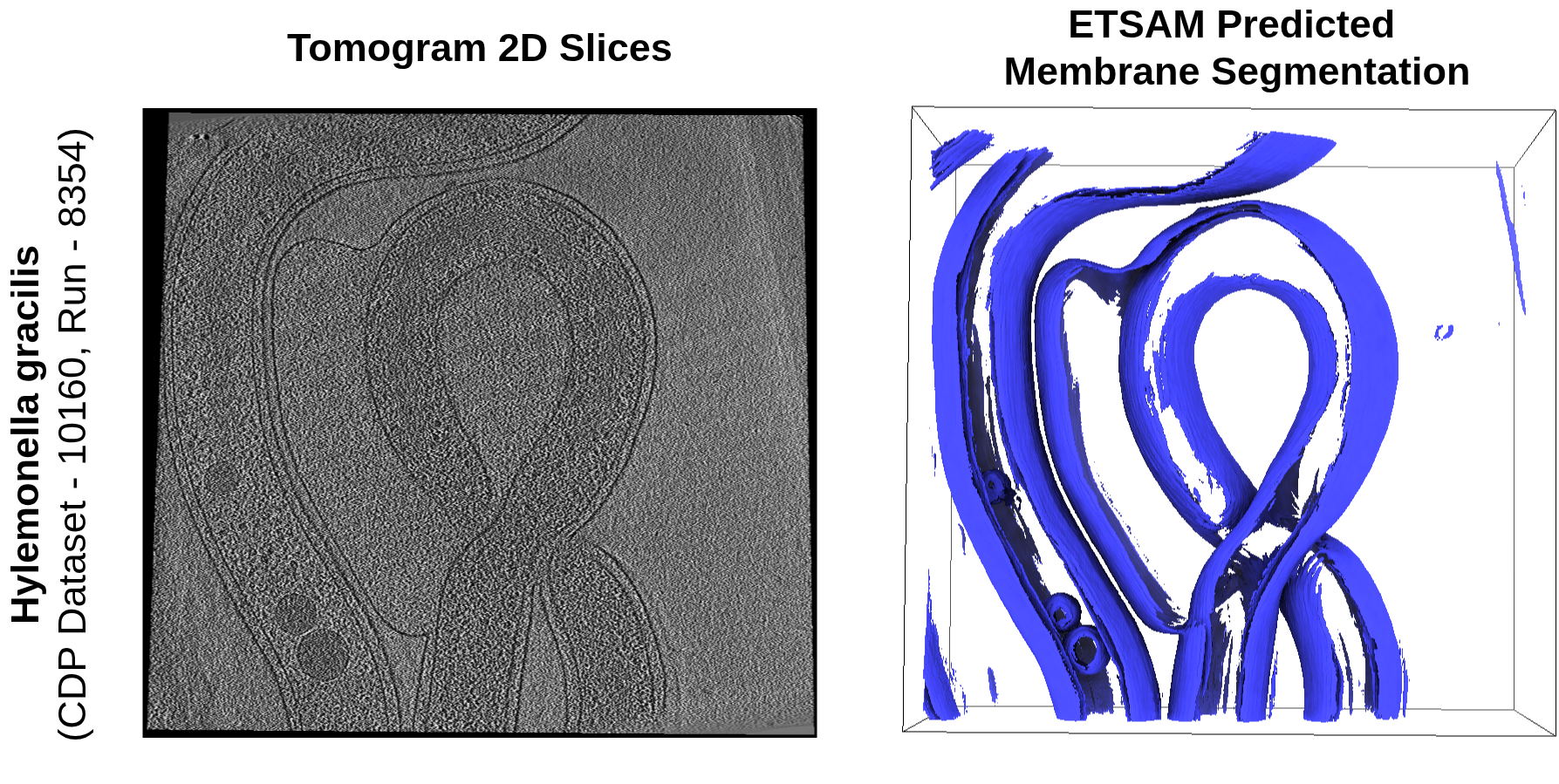
Example 2: Eukaryotic Cell with Post-processing
Section titled “Example 2: Eukaryotic Cell with Post-processing”This example demonstrates the --post-process flag using an experimental tomogram of Schizosaccharomyces pombe 972h- from the CryoET Data Portal (Dataset 10000, Run 247).
Download the Tomogram
Section titled “Download the Tomogram”In the demo folder:
wget -P data/ https://files.cryoetdataportal.cziscience.com/10000/TS_037/Reconstructions/VoxelSpacing13.480/Tomograms/100/TS_037.mrcRun ETSAM with Post-processing
Section titled “Run ETSAM with Post-processing”etsam data/TS_037.mrc \ --post-process \ --output-dir results/cdp_run_247/Expected Output
Section titled “Expected Output”==> Reading input tomogram: /home/user/demo/data/TS_037.mrcInput tomogram shape: (500, 928, 960), voxel size: (13.480796, 13.480796, 13.480796)==> Normalizing tomogram data with min_max_positive_values method==> Stage 1 prediction (prompt: grid_zero)==> Loading ETSAM with checkpoint: /home/user/etsam_env/checkpoints/etsam_stage1_v1.ptAdjusting hydra overrides for SAM2 video predictor==> Preprocessing the input mapLoading video frames from numpy array as Floating point arrayusing grid of points at first slice as mask prompt (grid_interval=50)==> Running ETSAM inference on preprocessed mappropagate in video: 100%|██████████| 500/500 [00:29<00:00, 16.73it/s]==> Stage 2 prediction (prompt: zero)==> Loading ETSAM with checkpoint: /home/user/etsam_env/checkpoints/etsam_stage2_v1.ptAdjusting hydra overrides for SAM2 video predictor==> Preprocessing the input mapLoading video frames from numpy array as Floating point arrayusing zero initialized empty mask as prompt==> Running ETSAM inference on preprocessed mappropagate in video: 100%|██████████| 500/500 [00:29<00:00, 16.76it/s]==> Saving predicted mask==> Post-processing: remove small noise (min_z_span=10)==> Post-processing: remove parallel membrane misconnections (max_bridge_len=5, max_spur_len=0)==> Saving post-processed mask-------------------------------------------------------------------------------------------------Output Files
Section titled “Output Files”When using --post-process, ETSAM saves both the raw and post-processed masks:
results/cdp_run_247/|-- TS_037_etsam_predicted_mask.mrc|-- TS_037_etsam_predicted_post_processed_mask.mrcVisualization
Section titled “Visualization”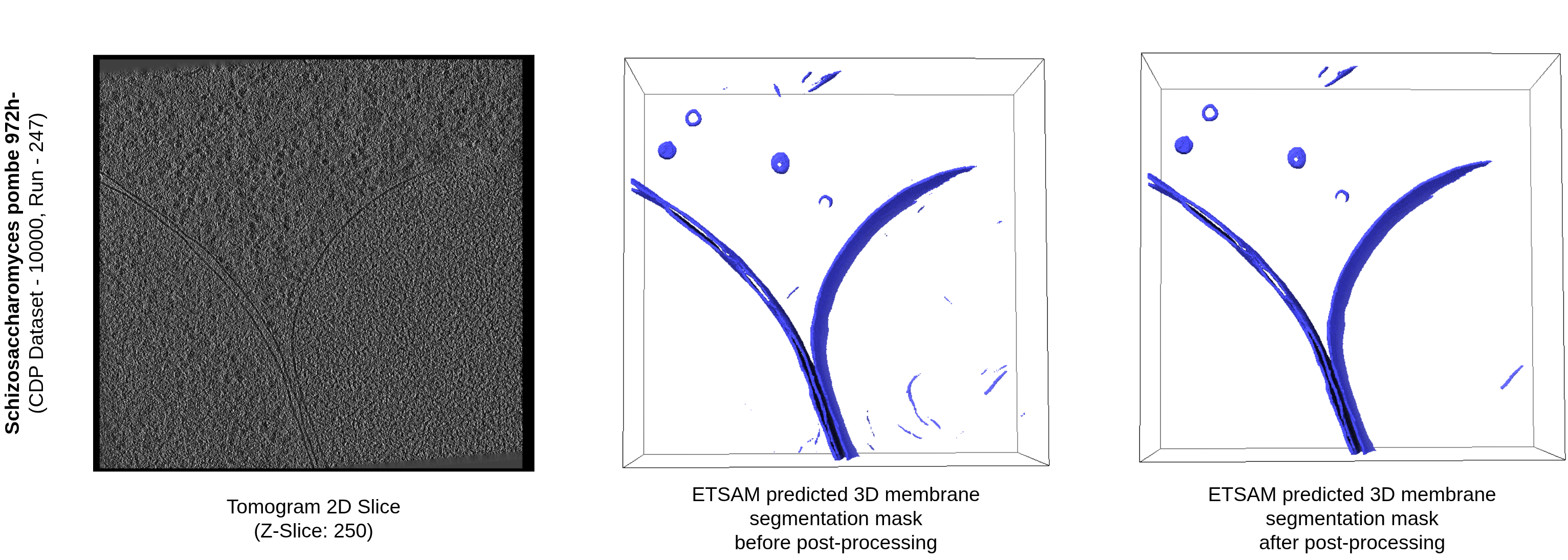
Next Steps: Downstream Analysis
Section titled “Next Steps: Downstream Analysis”The binary mask ETSAM produces is a standard .mrc volume aligned to your tomogram, which makes it a convenient starting point for membrane-focused downstream analysis. Common next steps include:
- Surface Morphometrics — convert the segmentation into a triangle-mesh surface to quantify membrane curvature, thickness, and inter-membrane distances.
- MemBrain-pick — detect and pick membrane-associated particles (e.g. membrane proteins) directly on the segmented surface.
- Manual refinement — load the mask alongside the tomogram in UCSF ChimeraX or IMOD to inspect, correct, or extract specific membrane regions.
To fine-tune the mask before passing it downstream — for example, by adjusting the binarization threshold or saving raw confidence scores — continue to Advanced Usage.